SIGN UP STEPS
school lessons

STEP 1
Click the “Create account” button below Step 3 to be taken to the page where you will create your account.
Please sign up with the email that you want our practice session pictures and all program information to be sent to.
Once your payment has been received, an email will be sent, asking for the participants' jersey size, as well as terms and conditions.
After you fill this out, you will see an “add profile” tab where you will put the participant's information and click “Continue.”

STEP 2
After creating your account, you will be brought to the “My profile tab.”
On the top, you will see 3 tabs named: “My profile” “Events” and “Membership.”
Please click on the “Membership” tab.
This will take you to a page with all the schools we provide our program in. Please find your school and select “Purchase.”

STEP 3
After selecting “Purchase” a tab will pop up with the school's name and program details.
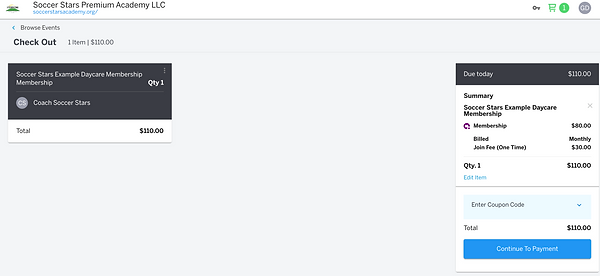
Please select the profile you are purchasing for and then click the blue “View in cart” button. You will then click the “Continue to payment” button and fill out your card information.
You will receive an invoice in your email of the transaction.
Please note that there is a one-time join fee that will be used to compensate for the uniforms.
Also, note that this card will be charged once a month until the program ends or the subscription is canceled.